Overview
Simployer webhooks let your systems react to HR changes in near real time. When an employee event happens in Simployer, we send a message to an HTTPS address you control, so you do not have to keep polling for changes.
Today, webhooks cover employee events. This article covers how to set them up and use them. The payload format and signature-verification steps are documented separately in the API reference.
What this article covers
| 1. How It Works Events and delivery | 2. Set Up a Webhook Step-by-step | 3. Supported Events What triggers a message |
| 4. Delivery & Reliability Timeouts, retries, order | 5. Security HTTPS and signing | 6. Test & Manage Test events and editing |
How It Works
A webhook is a message Simployer sends to your endpoint whenever an employee event happens. Instead of your system asking Simployer "has anything changed?" on a timer, Simployer tells you as soon as it does.
Employee Event Flow
| Simployer employee event happens | → | Webhook message sent over HTTPS to your URL | → | Your endpoint reacts to the change |
A webhook tells you that something changed, not the full current state. When you need the complete record, fetch it from the HRM One API.
Set Up a Webhook
1 | Open Webhooks Go to Settings > Integrations.  |
2 | Add a webhook and enter its details Select Add webhook and fill in:
|
3 | Save Click Add Webhook. The webhook is active immediately and receives all employee events. 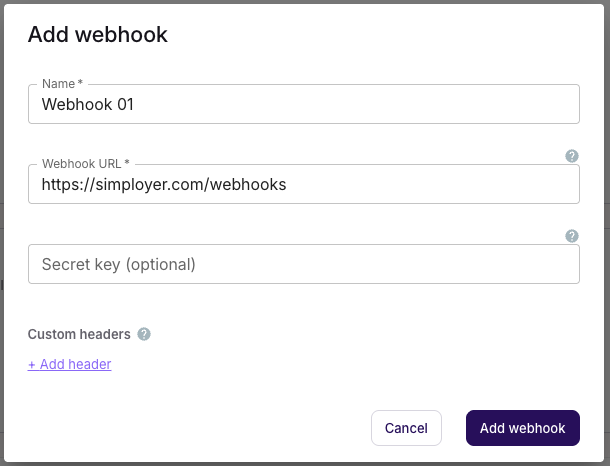 |
Supported Events
Webhooks are automatic. Once one is set up, Simployer sends each employee event to your endpoint as it happens — you don't request or trigger them. You receive all event types (there is no per-event selection); the only manual send is Send test event, for testing.
| Event | Triggered when |
|---|---|
| Created | A new employee is created. |
| Updated | Employee fields, including custom fields, are added or changed. |
| Deleted | An employee's profile is deleted. |
| Onboarded | An employee is onboarded and has been invited into the system. |
| Offboarded | An employee is offboarded. |
Delivery and Reliability
| Success. A delivery succeeds when your endpoint returns a 2xx response. Acknowledge quickly and do any heavy processing afterwards. |
| Order and duplicates. Ordering is not guaranteed, and the same event may occasionally be delivered more than once (delivery is at-least-once, not a result of retries). Each event carries a unique ID and a timestamp; use them to order changes and to skip duplicates you have already processed. |
| Change, not state. A webhook tells you that something changed, not the full current record. Fetch the complete record from the HRM One API when you need it. |
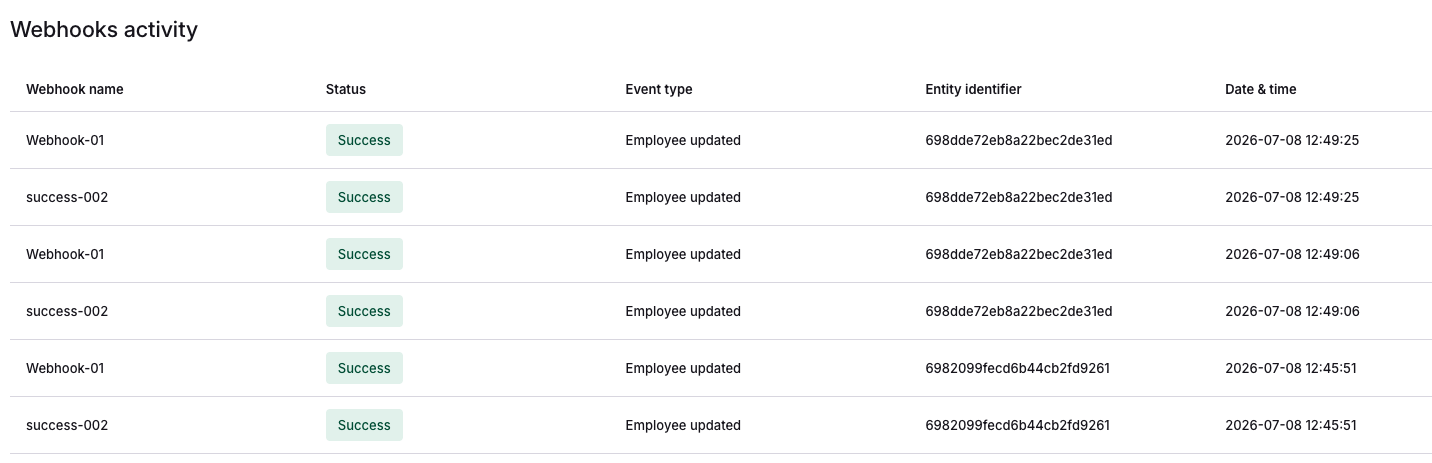
| Delivery log. Review delivery attempts and their outcomes in the webhook's delivery log. Log entries are retained for a limited period and then removed automatically. |

Security
| ✓ | HTTPS only. Deliveries are always sent over HTTPS. |
| ✓ | Validate input. Treat every payload as untrusted input and validate it before acting on it. |
| ✓ | Optional signing. If you set a Secret key, every delivery is signed so your endpoint can confirm it came from Simployer; with no secret set, deliveries are sent unsigned. The signature format and step-by-step verification are in the HRM One API reference. |
Test and Manage a Webhook
Use Send test event on a webhook to deliver a sample payload to your URL, so you can confirm your endpoint receives and accepts deliveries before relying on live events. The test uses synthetic data (a fictional "Test User"), not a real employee.

You can also manage a webhook after it is created:
| Settings | From the webhook's actions menu (⋯), choose Settings to change the name, URL, secret key, or custom headers. Changes take effect immediately. |
| Delete | From the same menu (⋯), choose Delete to stop receiving events. Deletion is immediate. |

Frequently Asked Questions
Can I choose which events I receive?
Not currently. A webhook receives all employee events; there is no per-event selection.
What happens if my endpoint is down?
The delivery is marked failed and is not retried. Monitor the delivery log and reconcile missed events from the HRM One API.
How do I stop receiving events?
Open the webhook's actions menu (⋯) and choose Delete.
What if the signature doesn't verify?
The most common cause is a secret key that no longer matches: if you changed the secret in Simployer but your endpoint is still using the old one (or vice versa), every delivery will fail to verify — update both to the same value. Other causes are computing the HMAC over a re-serialised copy instead of the raw body as received, or not appending ":" + X-Simployer-Timestamp before hashing (see the API reference for the exact steps). If none of these apply, treat the delivery as untrusted and do not process it — a mismatch can also mean the request did not genuinely come from Simployer or the body was altered in transit.
Related Articles
Was this article helpful?
That’s Great!
Thank you for your feedback
Sorry! We couldn't be helpful
Thank you for your feedback
Feedback sent
We appreciate your effort and will try to fix the article