Overview
Simployer One can receive absence data from Tripletex (inbound). Organisations that track absences via Tripletex timesheets can import leave entries (vacation, sick leave, and parental leave) into Simployer One's Time Off module without re-entering data manually. Tripletex remains the master system for absence management. Employees request and report their absences in Tripletex, not in Simployer One. The import brings this data into Simployer One for HR reporting and compliance visibility.
The import is manual, not scheduled. The typical workflow is once per month, importing the previous month's absences after timesheets are finalized in Tripletex. Before importing, the admin previews all entries to review conflicts and unmapped codes.
What this article covers
| 1. How It Works Import flow explained | 2. Prerequisites What you need first | 3. Map Absence Codes Setup in both systems |
| 4. Run an Import Step-by-step | 5. Import Results Statuses and conflicts | 6. Key Rules Hours, conflicts, limits |
How It Works
This is an inbound integration: absence data flows from Tripletex into Simployer One. The import reads from Tripletex's timesheet module and converts relevant entries into absence periods in Simployer One's Time Off module. Only timesheet entries with a mapped leave code are included; entries without a matching code (including working time) are not imported.
The imported data gives HR a consolidated view of absences for reporting and compliance, alongside any absences managed directly in Simployer One.
Inbound Absence Flow
| Tripletex timesheet entries | → | Import Preview review, resolve conflicts | → | Simployer One Time Off module |
The import groups consecutive days with the same leave code into a single absence period. For example, if an employee reported "Vacation" for five consecutive days in Tripletex, Simployer One creates one five-day vacation period.
Prerequisites
| ✓ | An active Tripletex integration configured in Simployer One (Settings > Integrations) |
| ✓ | The Time Off module enabled in Simployer One |
| ✓ | Admin access to Simployer One (to configure absence codes and run imports) |
| ✓ | Admin access to Tripletex (to configure leave type codes on timesheet entries) |
| ✓ | Absence codes mapped between both systems (see next section) |
| ✓ | Employees in scope. The import only covers employees who were included in the integration scope when the Tripletex integration was originally configured. Employees added after setup may not appear in the import until the scope is updated. |
Map Absence Codes
Both systems need matching leave type codes so the import knows which Tripletex timesheet entry corresponds to which Simployer One absence type. This mapping must be configured on both sides. The available leave types in Tripletex depend on the activity number assigned to each timesheet entry type.
Supported absence types
The import currently supports three built-in absence types:
| Absence type | Description |
|---|---|
| Vacation | Annual leave / holiday (Ferie) |
| Sick leave | Self-reported and certified sickness absence |
| Parental leave | Maternity, paternity, and shared parental leave |
Other absence types recorded in Tripletex (care days, time off in lieu, custom codes, etc.) are not supported by the import at this time. Timesheet entries using unsupported types will appear under Unmapped leaves types in the preview.
In Simployer One
1 | Open Time Off settings Navigate to Settings > Time off settings. |
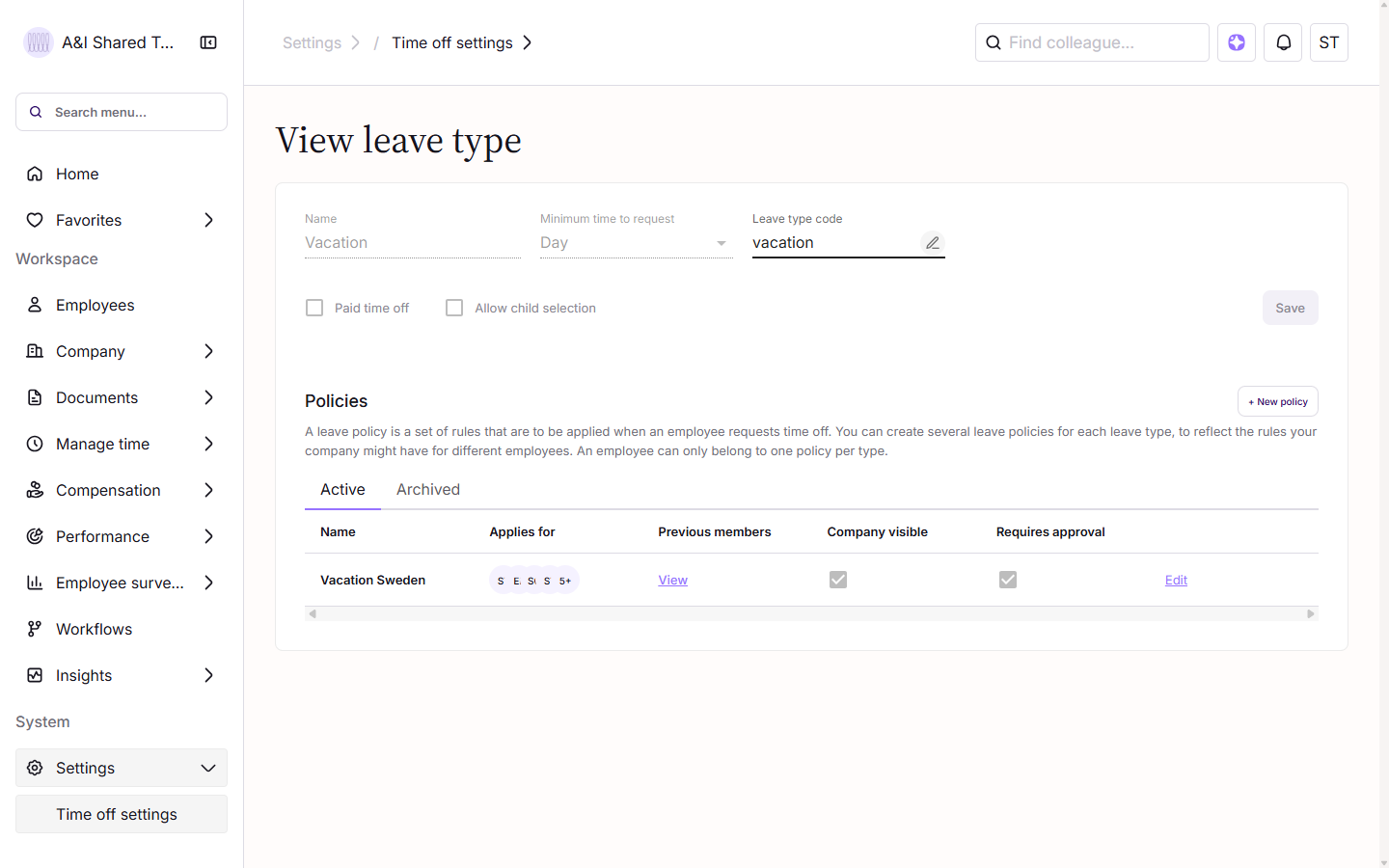
2 | Add the Leave type code For each absence type that should be imported from Tripletex, add the corresponding Leave type code. This code must match the value configured in Tripletex (see below). ![]() |
In Tripletex
1 | Open Timesheet settings Navigate to Time sheet > Settings. |
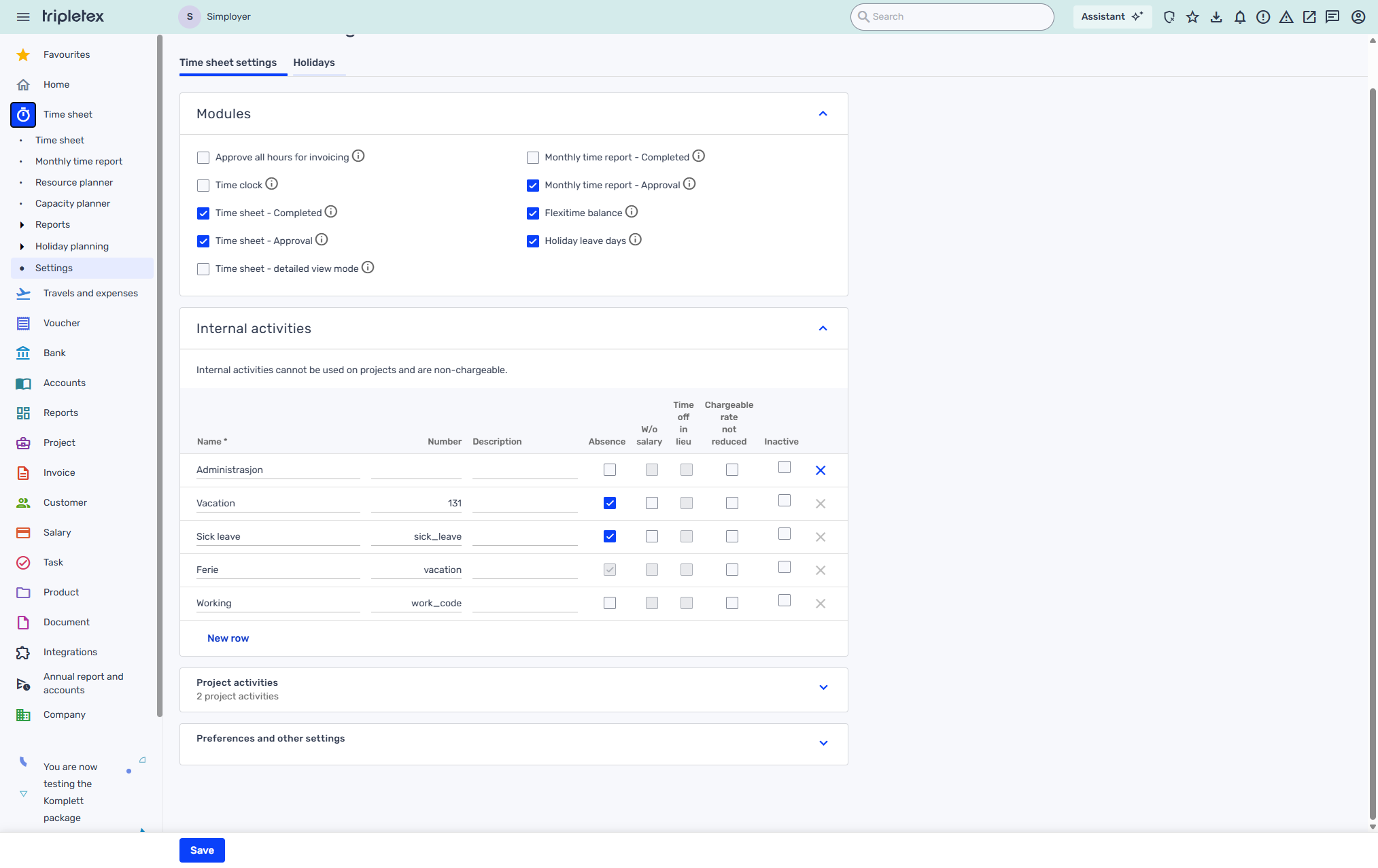
2 | Add Simployer codes via the Description field Open the Internal activities section. For each activity that represents an absence (vacation, sick leave, etc.), enter the matching Simployer leave type code in the Description field, and make sure the activity's Absence checkbox is enabled. Activities that represent working time should be left without a Simployer code in Description; they will be ignored during import. ![]() |
Run an Import
Imports are run manually. The typical workflow is once per month, importing all absences from the previous month. The import always starts with a preview, giving the admin a chance to review before confirming.
1 | Navigate to the import page Go to Manage time > Time off - Import. |
2 | Select the source system Select Tripletex from the drop-down menu.
|
3 | Preview the import Click Preview import. The system fetches timesheet data from Tripletex and compares it with existing absences in Simployer One. The preview groups entries into sections: Importable leaves, Already imported, Leave conflicts, Orphaned leaves, and Unmapped leaves types. A section only appears if it has at least one entry. |
4 | Review the results Check each category in the preview. Resolve any conflicts before proceeding (see Import Results below for details on each status type). |
5 | Confirm the import Click Confirm import to create all absences listed as "Ready to import" in Simployer One. Entries with conflicts or unmapped codes are skipped and remain unchanged. ![]() |
Understanding Import Results
The import preview groups entries into categories. Each category indicates what will happen when the import is confirmed.
| Section in preview | Meaning | Action Required |
|---|---|---|
| Importable leaves Row status: Ready to import | New absence from Tripletex with no matching entry in Simployer One. | None. These are imported when confirmed. |
| Already imported | An absence with the same type, dates, and duration already exists in Simployer One (regardless of whether it was created manually or by a previous import). | None. Automatically skipped to avoid duplicates. |
| Leave conflicts | An absence exists in Simployer One for the same date range, but with a different type. For example: "Vacation" in Simployer One overlaps with "Sick leave" coming from Tripletex. | Manual resolution. Decide which record is correct, then remove or adjust the incorrect entry in either Simployer One or Tripletex. Re-run the import afterward. |
| Orphaned leaves | An absence exists in Simployer One, but no corresponding timesheet entry exists in Tripletex for that period. | Review and decide: remove it from Simployer One if it should not be there, export it to Tripletex using Simployer's export function, or add it manually in Tripletex. |
| Unmapped leaves types | A timesheet entry in Tripletex uses a Description code that has no corresponding Leave type code in Simployer One. | Add the missing code mapping in both systems (see Map Absence Codes), then re-run the import. |
Key Rules and Limits
Full day vs. partial day Timesheet entries matching the employee's full workday length (as defined in their Simployer One work schedule) are imported as full-day absences. Shorter entries are imported as partial-day absences, with the duration recorded in minutes. | Date range limit Each import covers a maximum of 100 days. For longer periods, run multiple imports with consecutive date ranges. | Consecutive day grouping Consecutive days with the same leave code in Tripletex are grouped into a single absence period in Simployer One, rather than imported as individual days. |
Related Articles
Var artikeln till hjälp?
Toppen!
Tack för din feedback
Vi beklagar att det inte var till hjälp
Tack för din feedback
Feddback skickat
Vi uppskattar din feedback och uppdaterar artikeln vid behov