If someone other than the employee's manager should approve travel claims and expense claims, assign the Attestation substitute role.
Assign the Attestation substitute role
- Open the profile of the person who will take over the approval.
Navigate to:
Settings → Roles
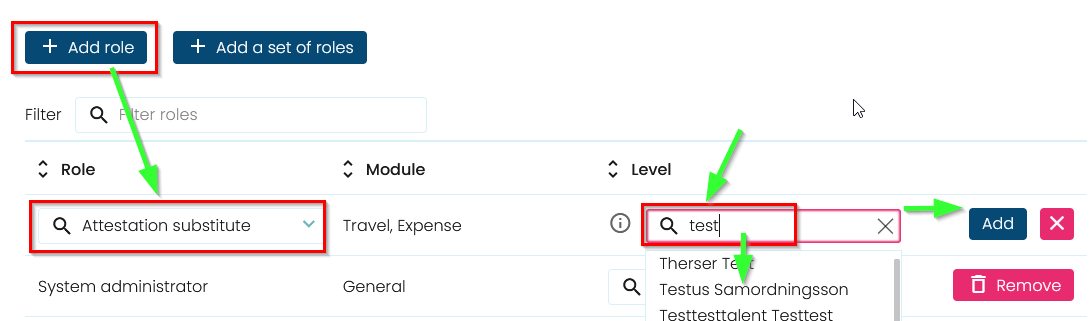
Click Add role and select:
Attestation substitute
After assigning the role, a new field will appear where you should search for the manager the person will act as an attestation substitute for.
Note: The manager is the employee's default approver. Therefore, you should select the relevant manager—not another employee.
- Select the manager and click Add
Result
All new travel claims and expense claims that would normally be sent to the manager will instead be sent to the selected Attestation substitute for approval.
Note: The Attestation substitute acts on behalf of the selected manager and takes over the approval of travel claims and expense claims.
Was this article helpful?
That’s Great!
Thank you for your feedback
Sorry! We couldn't be helpful
Thank you for your feedback
Feedback sent
We appreciate your effort and will try to fix the article