Simployer One now automatically imports follow-up plans from NAV and stores them directly in the document folders. This means your organisation has a permanent, centralised record of all follow-up plans even after NAV has deleted them from their system.
Why Did We Implement This Feature?
Norwegian employers are required to follow up on sick leave according to strict statutory timelines. Until now, this meant logging into NAV separately to access follow-up plans and accepting that NAV automatically deletes those plans four months after the case has been concluded.
With this integration, follow-up plans are fetched from NAV and saved as PDF documents in Simployer One. The documentation stays available for as long as you need it, with no risk of records disappearing.
Consent
No additional consent is required to enable this feature. If your organisation has already given consent for Simployer to fetch sick notes from NAV, that same consent covers the fetching of follow-up plans. No further action is needed on your part.
However, to start fetching follow-up plans, a setting must be toggled on in Simployer One. You can find this under Settings → Integration → NAV integration. Fetching of follow-up plans will not begin until this setting has been enabled.
Simployer will fetch follow-up plans retroactively for the one month prior to the consent, and continue fetching them going forward. If your organisation has not yet given consent for sick notes, you will need to do so before follow-up plans can be imported.
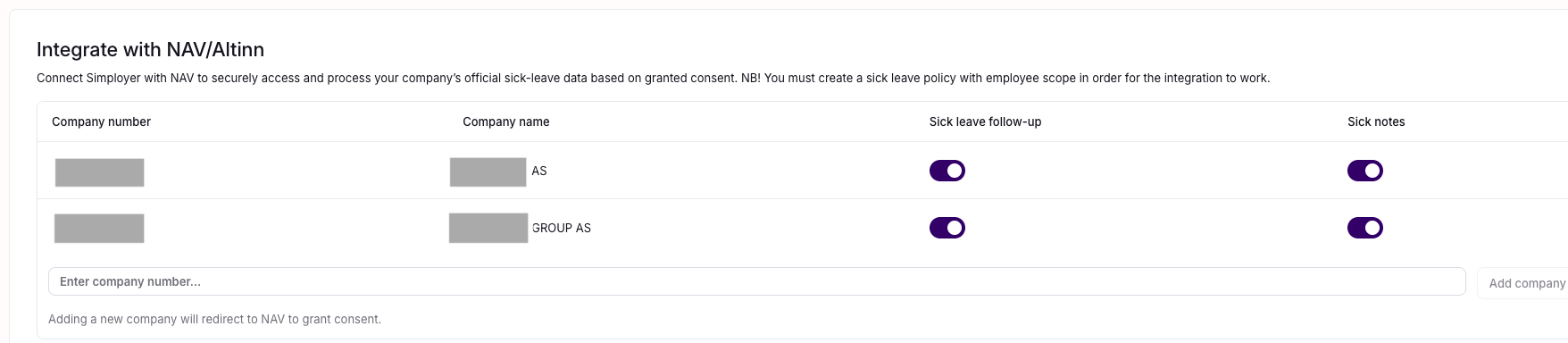
When Follow-Up Plans Are Imported
A follow-up plan is fetched from NAV and stored in Simployer One as soon as it has been signed by all parties and submitted in NAV. No manual steps are required, the document will appear automatically in Simployer One once this condition is met.
Where to Find the Documents
Follow-up plans are stored as PDF files under Shared Documents, and will be visible there for both the manager and the employee. You can find them by navigating to the Shared Documents section in Simployer One.
Who Can See and Edit These Documents
Access is managed automatically when a follow-up plan is imported.
| Role | View | Edit |
|---|---|---|
| Manager | ✓ | ✓ |
| Employee | ✓ | – |
The employee can view their own follow-up plan but cannot edit or delete it.
If the manager wants to give additional people in the organisation access to a follow-up plan, they can grant permission directly on the document. Once that permission has been granted, the document will also appear under Shared Documents for those individuals.
Notifications
When a follow-up plan is imported and stored in Simployer One, both the manager and the employee will automatically receive an email notification informing them that the document is available in the system.
No manual action is required to trigger these notifications, they are sent automatically as part of the import process.
Was this article helpful?
That’s Great!
Thank you for your feedback
Sorry! We couldn't be helpful
Thank you for your feedback
Feedback sent
We appreciate your effort and will try to fix the article