What is document protection?
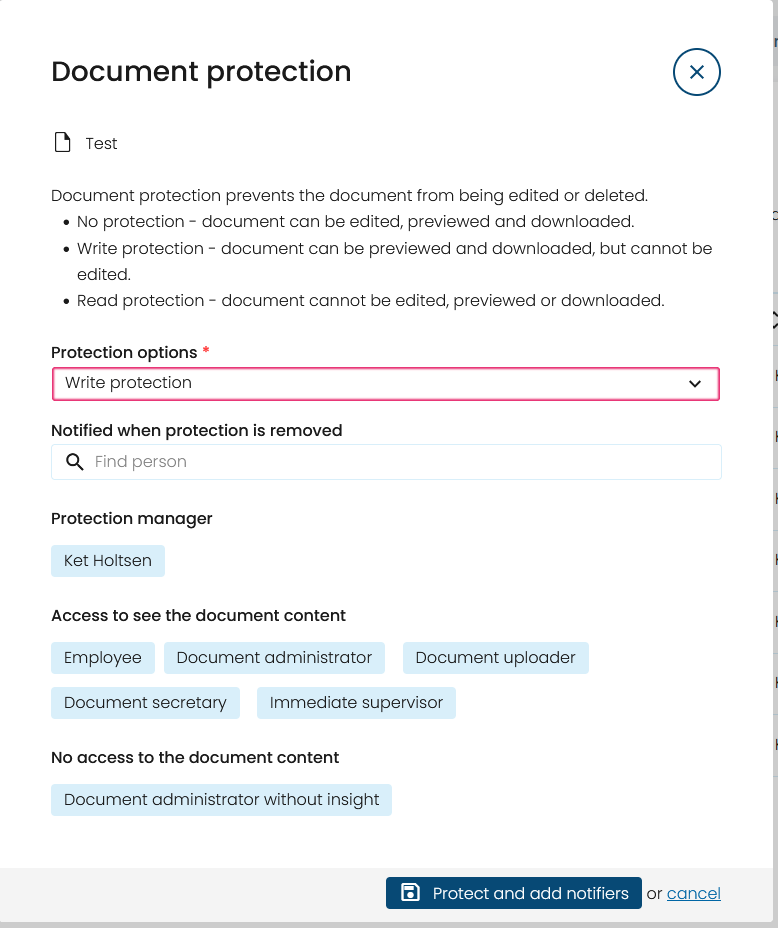
Document protection is used to restrict which actions can be performed on a document.
Access to a document is determined by the user's role, the document category settings and the protection level applied to the document. This article explains how document protection affects access.
What protection levels are available?
You can choose between three protection levels.
No protection
Users with the required permissions can view and manage the document.
Write protection
The document can be viewed and downloaded but cannot be edited or deleted.
Read protection
Only users with access to the protected document can view it. Other users cannot open or download the document.
Who has access at each protection level?
The table below shows the standard permissions for each role.
Note: Access may also be affected by the settings configured for the document category.
| Role | No protection | Write protection | Read protection |
|---|---|---|---|
| Document Administrator | View and edit | View | No access |
| Document Uploader | View and edit | View | No access |
| Employee | View | View | View |
| Line Manager | View and edit | View | No access |
| Document Administrator (No Insight) | No access | No access | No access |
Who is the Protection Owner?
The user who applies write protection or read protection automatically becomes the Protection Owner.
The Protection Owner can:
- change the protection level
- remove the protection
- choose who should receive a notification if the protection is removed
How do notifications work?
When a document is protected, the Protection Owner can select one or more recipients to be notified if the protection is removed.
If a Document Administrator removes the protection, notifications are sent to:
- the user who applied the protection
- all selected notification recipients
What happens if the Protection Owner leaves?
If the Protection Owner is deactivated in Simployer Classic, a Document Administrator can take over the administration of the document.
This ensures that protected documents can still be managed if the original Protection Owner is no longer active.
Related articles
- Protect documents
- Roles in Documents in Simployer Classic
- Document categories
- Documents on employees
Was this article helpful?
That’s Great!
Thank you for your feedback
Sorry! We couldn't be helpful
Thank you for your feedback
Feedback sent
We appreciate your effort and will try to fix the article