What this is and who it is for
Sia, the AI assistant in Simployer One Handbooks, draws on the documents attached to your handbook articles — not only on the article text itself.
The procedures, guides and instructions you have already attached become part of what Sia answers from. Everyday questions like how to submit expenses, how to get IT equipment set up, or what the travel rules are are usually already answered somewhere in your own documentation. This puts that documentation within Sia's reach, in the place your employees already ask.
Who this is for
• Employees and managers asking Sia questions. Answers may now draw on your organisation's own documents. Nothing changes in how you ask.
• Handbook administrators. Nothing new to configure, and one optional control if you want to exclude a specific file.
This applies to Simployer One Handbooks. It does not apply to Handbooks Classic.
How to access and use it
There is nothing to switch on. A document is available to Sia while it is attached to at least one handbook article.
1. Attach a document to a handbook article. See "Manage your handbook files in one place".
2. The document becomes available to Sia shortly afterwards. Indexing happens in the background — there is no manual step and nothing to switch on. It is not instant, so allow a few minutes after attaching a document or changing one.
3. Ask Sia a question your document answers. The answer draws on the document alongside the article text.
Excluding a specific file
If there is a file you would rather Sia did not use:
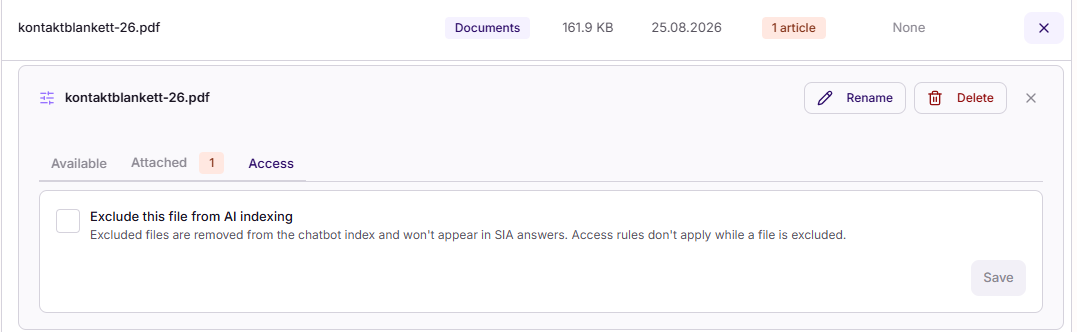
1. Open the file's Access tab.
2. Switch on "Exclude this file from AI indexing".
3. The file is removed from the index and is never used in answers, whatever it is attached to. Switching it off again queues the file to be indexed once more.
Supported files
• Formats: PDF, Word, Excel, PowerPoint, plain text and CSV.
• Size: up to 15 MB per file.
• Languages: Norwegian, Swedish and English — including when the question is asked in a different language from the document.
Frequently asked questions
1. Do I need to give Sia permission to read a document?
No. A document follows the reading permissions of the article it is attached to, so there is no separate AI permission to assign. If you have a file that people can open but Sia should not use, exclude it on the file's Access tab — see Excluding a specific file above.
2. Can an employee get an answer from a document they are not allowed to read?
No. If an employee cannot read the article, they cannot get answers from the documents attached to it.
3. Two colleagues asked Sia the same question and got different answers. Why?
Most often because they have different reading permissions, so Sia had different documents available to each of them. This is working as intended.
4. I attached a document but Sia does not use it. What should I check?
- Has enough time passed? Indexing runs in the background and is not instant. Wait a few minutes after attaching or changing a document, then try again.
- Is it attached to at least one article? A file attached to nothing is not used.
- Has it been excluded on the file's Access tab?
- Is it a scan or a photograph? See question 5.
- Does the person asking have access to the article?
5. I attached a scanned document and Sia cannot answer from it.
Scans and photographs contain no readable text, so the file attaches successfully but yields no answers. To make the content available, supply it as text — a text-based PDF or an Office file — rather than a scan or photograph.
6. Can Sia tell me which document an answer came from?
No. Answers are attributed at article level. A document's content is held as part of the article it is attached to, so there is no separate document for the answer to point at.
7. My document has tables. Will Sia read them correctly?
Document content becomes plain text, so tables, headers, footers and multi-column layouts lose their structure. Sia reads the words, not the layout. A rule that depends on sitting in the same table row as its condition may not come through as intended. Where precision matters, state the rule in the article text as well.
8. Does Sia know whether a document is out of date?
No. The only date available is the parent article's modified date, so an outdated document is answered from with the same confidence as a current one. Keeping attached documents current is worth including in your own review routine.
9. What about the documents in Company Documents?
This covers documents attached to handbook articles only. Files held in the Simployer One company-document space are not included.
10. Is Sia trained on our documents?
No. Sia reads the attached documents at the moment a question is asked. Your documents are not used to train the model, and nothing you attach changes how Sia behaves for anyone else.
11. Do we have to do anything to get this?
No. If you already have documents attached to handbook articles, the change applies automatically. The more you have attached, the more difference you will notice.
12. How do I know when a document is ready for Sia to use?
There is no readiness indicator to check. Indexing runs in the background and usually completes within a few minutes. The practical test is to ask Sia a question the document answers — if you get an answer drawn from it, it is ready.
Was this article helpful?
That’s Great!
Thank you for your feedback
Sorry! We couldn't be helpful
Thank you for your feedback
Feedback sent
We appreciate your effort and will try to fix the article