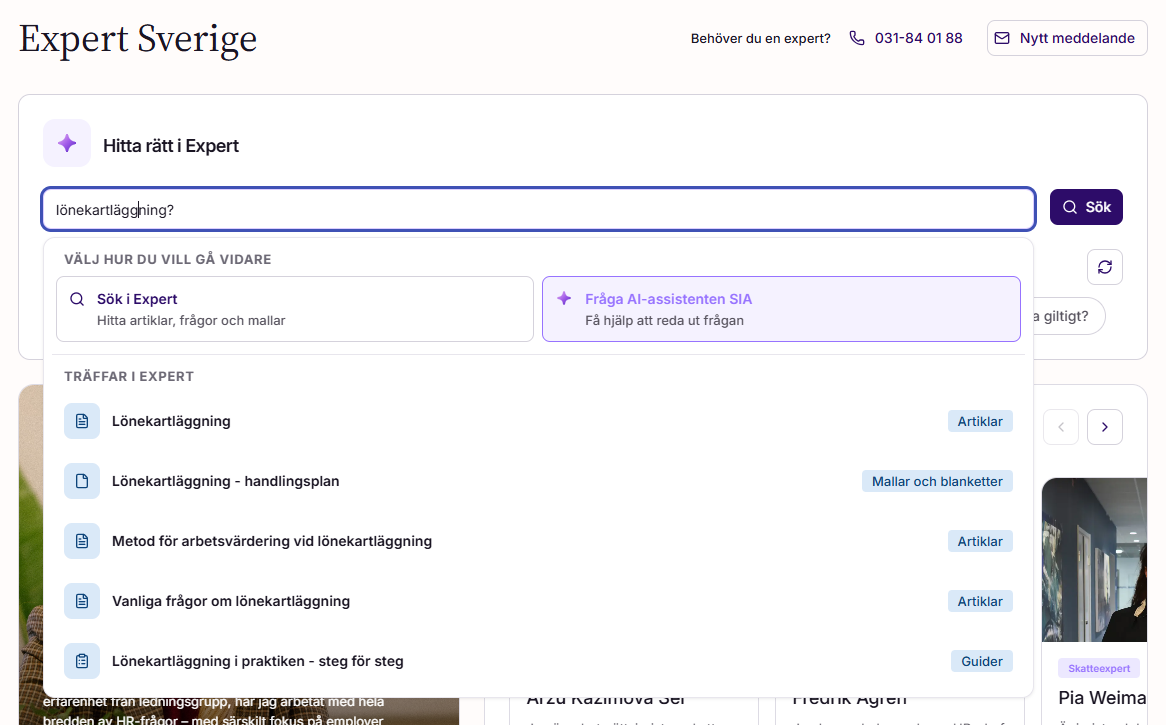
The Expert front page has one field at the top. Type what you are looking for, then choose how you want the answer: as search results, or as an answer from Sia.
How do I start from the Expert front page?
1. Open Expert.
2. Type your topic or question in the field at the top of the page.
3. Choose one of the two buttons next to the field:
- [Search in Expert] shows a list of Expert articles that match your words.
- [Ask AI-assistant Sia] sends your text to Sia.
You can use the same text for both. Run a search first, then send the same text to Sia, or the other way round.
When should I search, and when should I ask Sia?
Search when you know the topic and want to read the articles yourself, for example a rule, a form or a term you already know the name of. Ask Sia when you have a situation and want an answer to it, for example a question about what applies to a specific employee.
Where have Questions and Categories gone on the Expert front page?
Questions and Categories now sit side by side, below the field at the top. Categories is a list of rows, each with an icon and a title, in the same style as the Questions list. It was previously a grid of cards.
The Tabloid section and the Experts carousel are where they were.
Is the new front page the same in Sweden and Norway?
Yes. The Swedish and the Norwegian Expert front page have the same layout.
Does an administrator need to turn the new front page on?
No. The new front page is on for everyone with access to Expert. There is nothing to configure.
Was this article helpful?
That’s Great!
Thank you for your feedback
Sorry! We couldn't be helpful
Thank you for your feedback
Feedback sent
We appreciate your effort and will try to fix the article